

How Jira Service Management unifies IT, HR, legal, finance, and facilities
Digital transformation is shining a light on the gaps between different teams delivering service. Let's look at how JSM can bridge those gaps and improve cross-functional effectiveness.
Summary
- Jira Service Management (JSM) is an enterprise service management platform whose true power lies in breaking down silos between business departments.
- The reason these silos exist is because IT, HR, legal, finance, and facilities have all traditionally relied on different tools and methods to deliver service, e.g. email, HR information systems, ERP software, Slack.
- As organisations move to digitally transform, these gaps in cross-functional effectiveness are becoming clearer and more pronounced.
- Jira Service Management bridges the gaps between IT and business teams in two main ways: the help centre that offers services from a single access point, and process automation.
The true power of an enterprise service management tool
The reason Jira Service Management (JSM) gets touted as an enterprise service management (ESM) solution is not just because its capabilities can be extended beyond the IT team.
Yes, it has project templates for departments such as HR, legal, finance, and facilities, so that those teams can spin up service desks and manage requests with all the visibility and efficiency that the IT team enjoys.
But the true power of Jira Service Management as an ESM tool is in how it gets all those departments working together. In how it breaks down silos between teams whose goals and processes overlap. And in how, by getting those departments collaborating seamlessly, internal and external customers receive a fast, consistent, and dependable service from the entire organisation.
So let’s focus on how Jira Service Management bridges the gaps between IT, HR, legal, facilities, and finance to facilitate cross-functional service delivery.
What is enterprise service management?
We explored this in more detail in an earlier blog about ESM, but to reiterate: enterprise service management is the use of established IT service management (ITSM) principles and capabilities to enable business teams to deliver better service.
Although, for our purposes, a more apt definition would be: the use of ITSM principles and capabilities to enable the whole organisation to deliver better service.
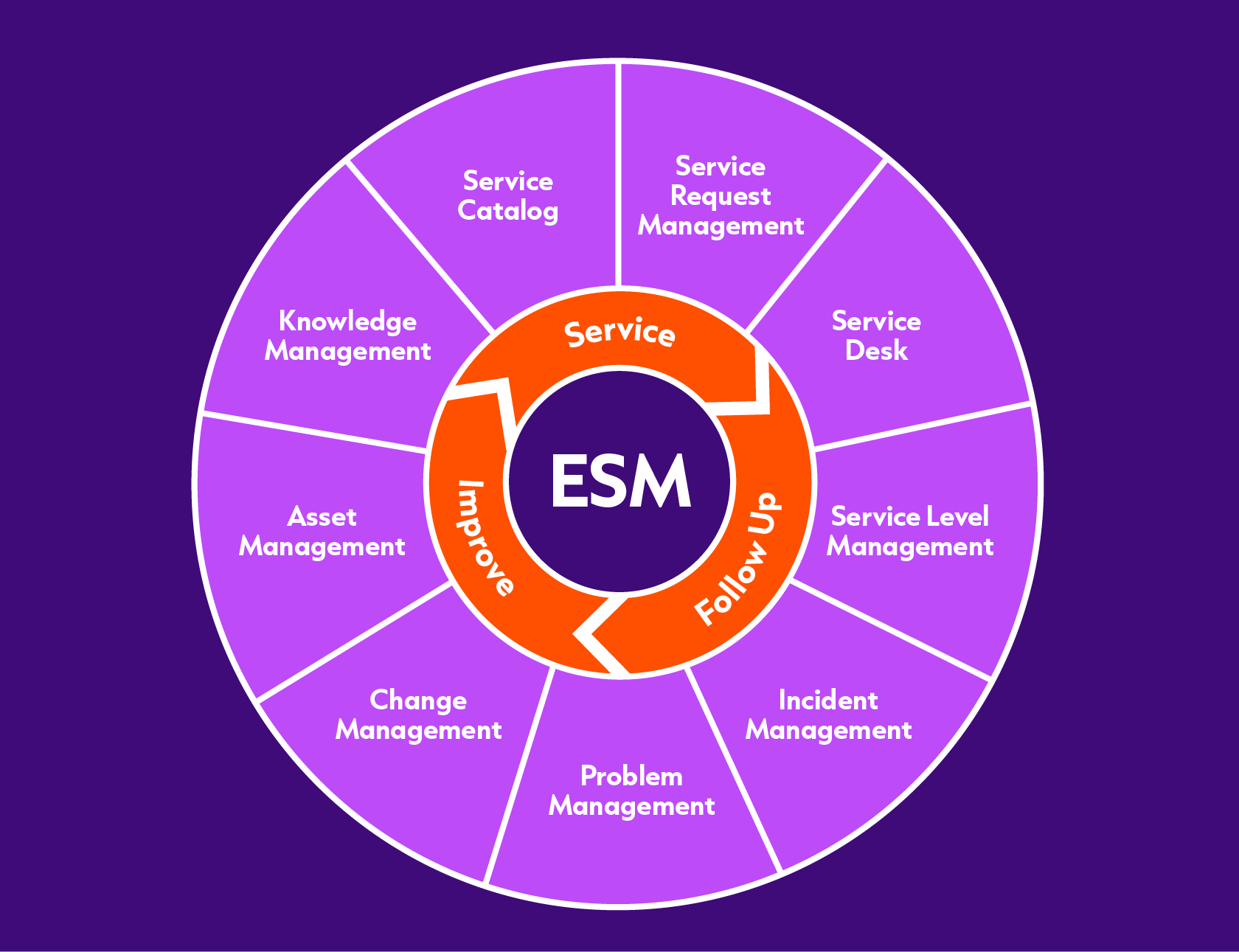
We say this because you could be mistaken for thinking that if you give your HR and finance teams ITSM-style service desks, it’s job done and you’ve achieved enterprise service management. Sure, if your business teams are using the same service desk as your IT team, you’re half the way there. But only half. To fully achieve ESM, you have to set up your ITSM tool so that information can flow automatically between your IT and business teams. This is what Jira Service Management was made for.
But before we get on to how JSM can facilitate these connections between teams, let’s find out why those teams are traditionally disconnected.
Why the gaps exist in the first place
The gaps exist because all these departments have been doing their own thing, working with their own tools, delivering service the way they see fit.
It means that when these departments need to work together, it’s a case of each team throwing responsibilities over the wall at each other without any visibility of what the other is doing.
Employee onboarding is a good example of when cross-functional service delivery is required.
Employee onboarding without enterprise service management
When a new hire joins an organisation, multiple departments have to complete interconnected tasks. HR manages contracts and benefits. IT needs to provision accounts and hardware. Facilities has to assign a workspace. Legal handles non-disclosure agreements (NDAs) and compliance paperwork. Finance sets up payroll.
Without enterprise service management, each department completes its task in isolation and coordination between teams is handled over email. You’re likely to have at least four email threads, usually between HR and each of the other departments. Or maybe you have different departments copied into the same email thread. Neither way is efficient because email itself is slow and messy. Handoffs between departments aren’t structured, which is why requests get missed and new hires turn up on their first day to find they have no desk or laptop or authority to access anything.
How digital transformation illuminates these gaps
As organisations move to digitally transform, it becomes easier to see how different teams are siloed.
Senior managers who want an overarching view of progress will see it the clearest. Because they won’t be able to get an overarching view of progress. Let’s go back to the onboarding example. IT is using Jira, HR is using a HR information system (HRIS), facilities is using Slack, and legal is using email or contract management software. If the onboarding tasks are managed across separate platforms, there’s no shared visibility and central oversight is impossible.
It’s not just managers who’ll see it. The end users see it too. In a digitally transformed workplace, employees expect seamless end-to-end service experiences so that there are no barriers to their productivity. But if they have to bounce between systems, their experiences are inconsistent and disjointed. What might have been tolerated when everything was manual now feels outdated and frustrating.
How Jira Service Management erases the gaps and brings teams together
There are two main ways that Jira Service Management brings disparate teams together:
- With a single unified service portal/help centre that displays all available services as a catalogue
- By automating cross-functional processes and workflows.
Let’s take these in turn.
A single place to find and ask for help
Whether an employee needs to order a new laptop, request a statement from the finance team, or notify HR about a new starter, Jira Service Management lets you get help from a single place: the help centre.
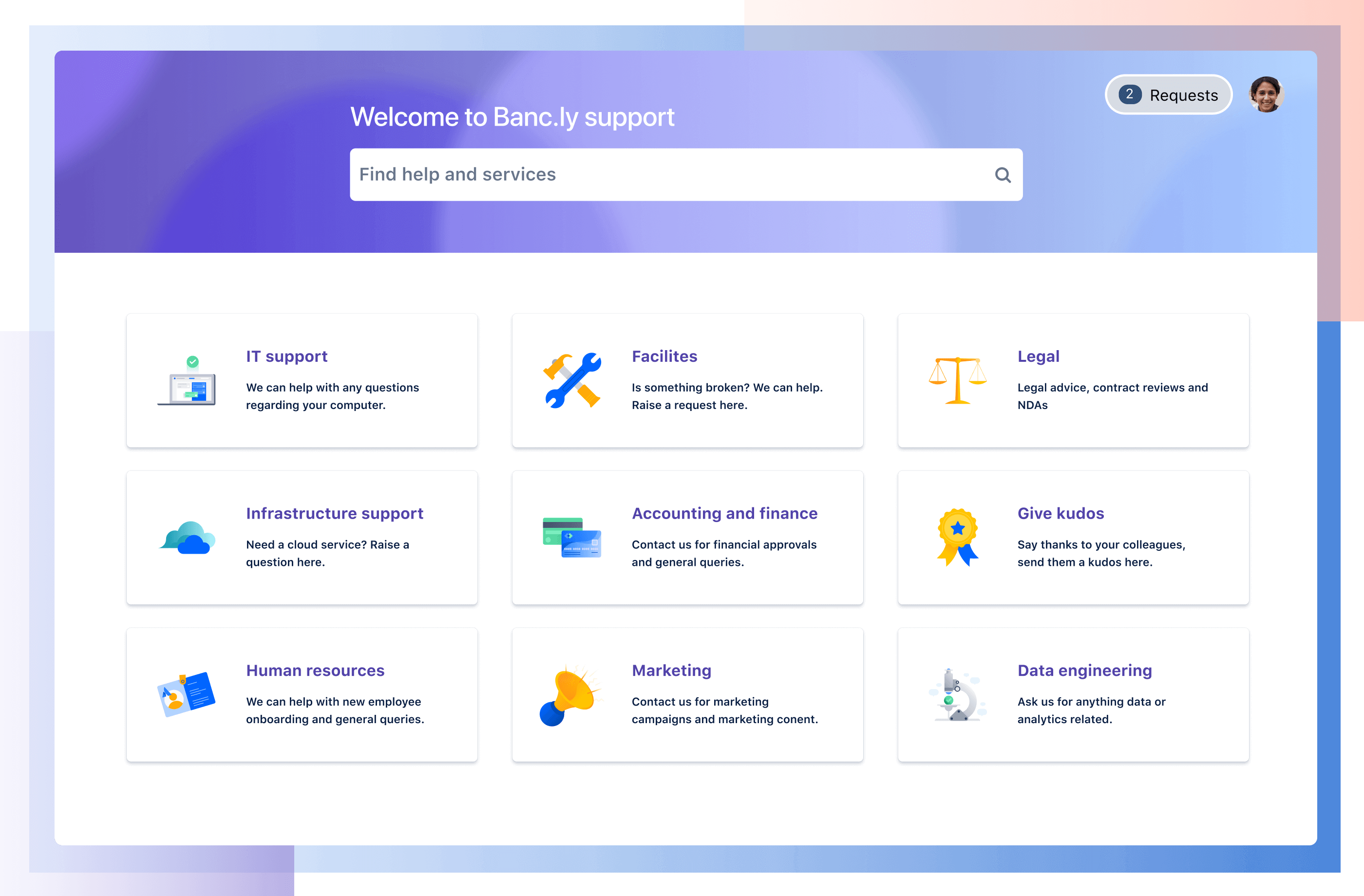
A default help centre is automatically set up for your JSM site. It displays the customer portals for all the service projects on your site, along with other curated help resources (such as knowledge base articles and links to external resources).
As the portals link to the IT project, the HR project, the legal project etc., the JSM help centre lets users imagine that all services are coming from the same place. In reality, each service project sitting behind the help centre has its own request types, workflows, and service-level agreements.
What the shared portal experience does is erase the silos from the employee’s perspective. Request forms have a unified design, navigation is consistent, and status updates follow the same pattern. Knowledge base articles from multiple departments appear in one place. You can see the status of all your requests in one view. Alternatively you may only see one request even though, behind the scenes, several teams are working on it via multiple work items.
Basically, the employee has a simple, clear experience whatever service they’re seeking.
JSM automation
While the help centre bridges the gaps between different services for employees, JSM automation bridges the gaps between the teams delivering those services.
JSM’s automation engine is a low-code/no-code feature that ensures work and information flow seamlessly between IT, HR, legal, finance, and facilities without manual coordination.
For example, an action in one service project can automatically create linked work items in another. Let’s go back to the onboarding example. When HR opens a new hire onboarding request, JSM can automatically create:
- an IT task to provision a new laptop
- a finance task for payroll setup
- a facilities task to allocate a desk
- a legal task for NDA preparation.
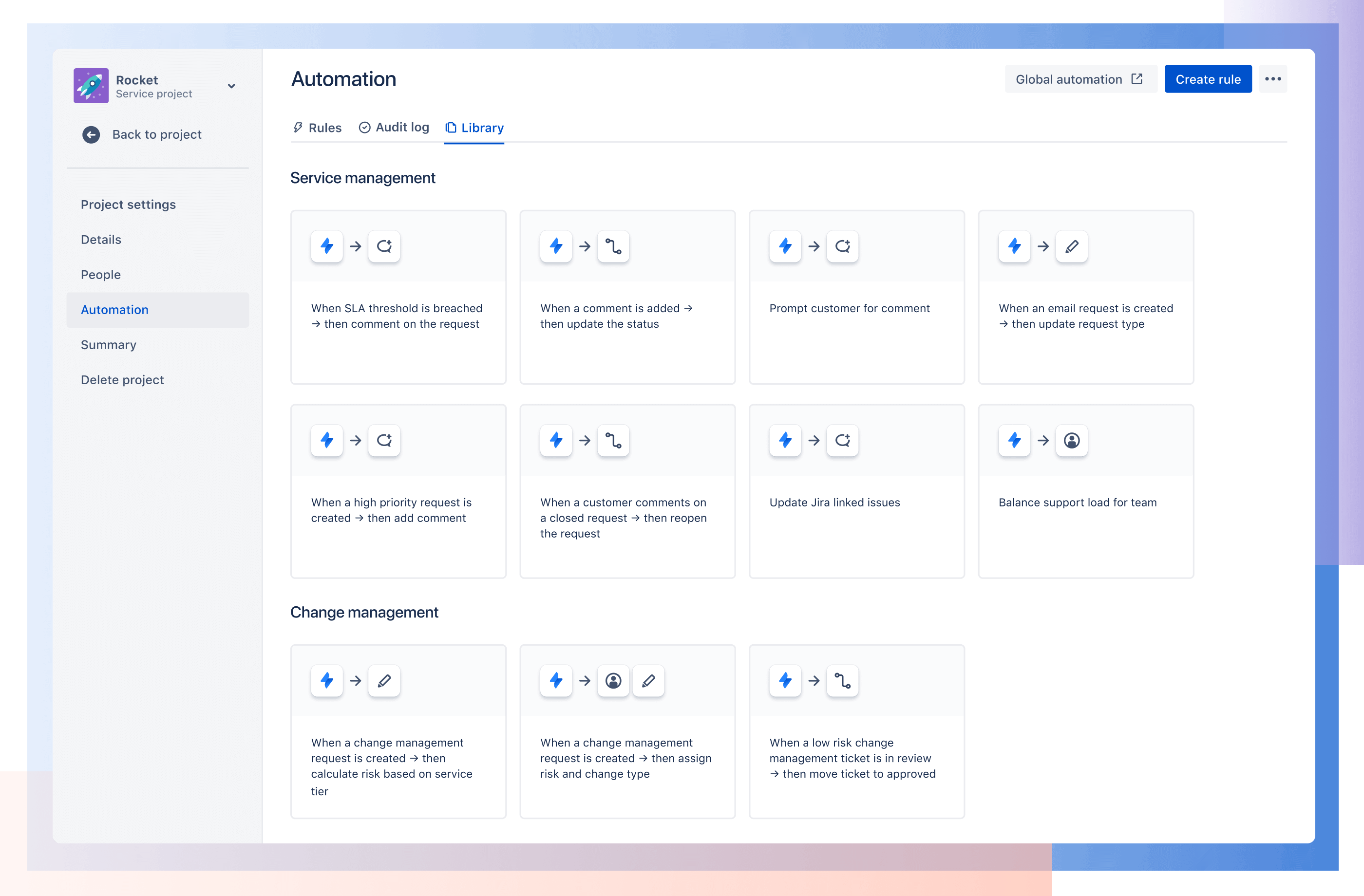
Automation will pull relevant information from the original request and copy it into each team’s tasks. It can send updates to stakeholders or escalate tasks with reminders if one department is holding up the workflow. And it can also enforce sequencing when one team’s work depends on another, e.g. an IT task for account creation is only triggered after HR confirms the contract is signed.
The clear need for enterprise service management
Digital transformation shines a spotlight on what used to be hidden inefficiencies in the way multiple departments worked together to deliver service. Nowadays, these inefficiencies are becoming highly visible pain points and the need for enterprise service management is ever clearer.
By bringing IT, HR, legal, finance, and facilities into a single platform, Jira Service Management can help deliver the seamless, end-to-end service that customers, employees, and service agents all expect.
If you’re interested in learning more about Jira Service Management and ESM, contact us for a personalised demo.

