

Jira Service Management pricing under the Service Collection
Has the price of Jira Service Management changed with the launch of the new Service Collection? This article looks at what's changed, what you get under each plan, and what additional costs you should consider.
Summary
- Jira Service Management (JSM) is now only available as part of a package called the Atlassian Service Collection.
- The package includes Jira Service Management, Assets, service-focused Rovo agents, and a new app, Customer Service Management (CSM).
- Jira Service Management pricing is therefore Service Collection pricing from this point forward.
- Service Collection pricing tiers are the same as JSM’s pricing tiers (free, standard, premium, enterprise). The prices are the same but you now get extra functionality in every tier, thanks to the new CSM app.
- JSM pricing has not changed with the introduction of the Service Collection.
- There are other costs to consider, such as extra AI agent usage, more asset capacity, Atlassian Marketplace apps, and implementation services.
Has JSM pricing changed?
At Team ‘25 Europe, the Atlassian Service Collection was launched, bundling Jira Service Management (JSM) into a package containing other apps. If you’re wondering whether the new Service Collection is a different price to JSM on its own, you’re not alone.
The short answer is, no. Jira Service Management pricing hasn’t changed with the launch of the Service Collection.
But there are a few new things to consider, especially if you’re thinking of implementing the platform in the future.
So while the short answer is no, the long answer is… the rest of this article. ;)
All pricing mentioned in this article is in USD (excluding taxes).
What is Jira Service Management?
Jira Service Management (JSM) is an enterprise service management (ESM) platform that empowers all teams to deliver great service fast, through cross-functional collaboration and AI-powered automation.
It began life as an IT service management (ITSM) tool that made IT teams more efficient. It has since evolved to become an ESM tool, designed to help the rest of the organisation adopt the same practices as the IT team, such as request fulfilment and knowledge management.
In practical terms, JSM is a knowledge base that employees use to self-serve, and a ticketing engine that employees use to raise requests. In the back end, support agents use work items, queues, service-level agreements (SLAs), asset linking, automation rules, and a Confluence-powered article creator to manage requests, incidents, changes, and knowledge.
What is the difference between Jira and Jira Service Management?
Jira Service Management is built on the same Jira Cloud platform your organisation might already be using for project and work management.
Jira is for teams who want to manage their work with tickets, agile boards, and customisable workflows. It acts as a central place to plan, track, and discuss work.
Jira Service Management is specifically for support teams who want to manage service delivery with a help desk and self-service portal.
Jira and Jira Service Management share some of the same features, such as work items, custom fields, and project templates. But they’re used for fundamentally different purposes: managing day-to-day work vs managing service.
What is the Atlassian Service Collection?
The Atlassian Service Collection is Atlassian’s service management toolset, an AI-powered bundle of apps for delivering service to internal and external customers efficiently. The package includes:
- Jira Service Management: Atlassian’s core service management offering for IT, development, and business teams
- Customer Service Management: a brand new app designed for external customer support
- Assets: a database for managing assets such as hardware, software, facilities, equipment, and custom objects, and connecting them to requests, incidents, and changes
- Rovo: Atlassian’s AI agents, which help improve productivity across service work by triaging and fulfilling requests, resolving incidents, and summarising information.
Can you buy Jira Service Management on its own, without the other apps?
No. You can no longer buy Jira Service Management by itself. You can only buy the Service Collection, which comes with Jira Service Management, Assets, Rovo, and a new app, Customer Service Management (CSM).
Bear in mind that you couldn’t buy Assets on its own either. It came with your JSM Premium or Enterprise plans.
So really, only a few things have changed:
- The name of the plan (from a Jira Service Management plan to a Service Collection plan)
- The fact that the plan comes with a new app, CSM
- New asset limits (up to 500K asset objects in Enterprise).
In other words, if you were on a Jira Service Management Premium plan, you will have automatically moved to a Service Collection Premium plan. With a new app available for you to use if you wish to.
Is the Service Collection more expensive than Jira Service Management?
Again, no.
Even though Jira Service Management is now only available as part of a package, Service Collection pricing remains aligned with JSM pricing, with no added charge for the new CSM app.
Basically, JSM is the same price, but with more value included.
Atlassian Service Collection Pricing
Jira Service Management pricing is now Service Collection pricing. The tiers are the same, and still based on the number of support agents who’ll be using the tool.
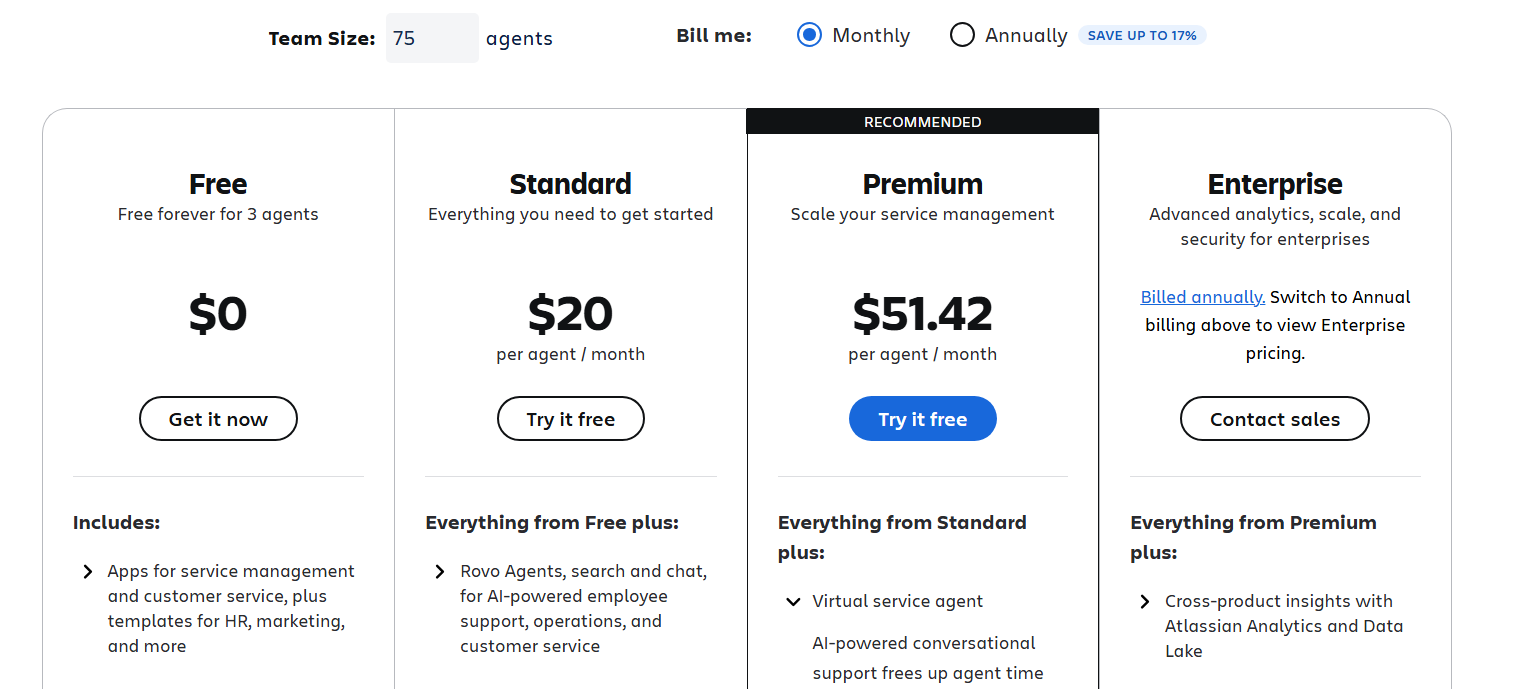
The Atlassian Service Collection has four pricing tiers:
- Free: $0 for up to 3 agents
- Standard: starts at around $20 per agent per month
- Premium: starts at around $51 per agent per month
- Enterprise: this is billed annually and starts at $168,500 per year for 201-300 users
Service Collection Free Plan
This is ideal if you’re just starting out or you only have a very small support team. It supports up to 3 agents and comes with both Jira Service Management and Customer Service Management (but not Assets or Rovo).
Both JSM and CSM come with spaces, queues, work item types, SLAs and reports, an embedded knowledge base, and customisable self-service capabilities. You can also manage an unlimited number of customer requests.
On the Free plan, you’re limited to 2 GB of file storage, 100 email notifications a day, 500 automation rules runs per month, and Atlassian Community support only.
Service Collection Standard Plan
The Standard plan is best for growing teams that would benefit from advanced features such as AI-powered automation. It offers support for up to 20,000 agents.
It has all the features of the Free plan, along with Rovo search and chat capabilities, and Rovo agents who help with incident management. However, it doesn’t include the JSM AI agent.
Even though you don’t get the JSM AI agent, you do get the CSM AI agent. The CSM AI agent is actually way more powerful and customisable than the JSM one. You can give it an identity, create guidance on how it should behave, test it before you deploy it, and configure seamless escalations to real support agents. It can also draw knowledge from external websites (the JSM AI agent can only draw from the knowledge base).
You also get custom domains for your JSM help centre, unlimited email notifications, 5,000 automation rule runs per month, 9 to 5 regional support, 250 GB of file storage, and multi-region data residency options.
Service Collection Premium Plan
Atlassian recommends its Premium plan for larger organisations who need more advanced service management features and support.
This plan includes everything in the Standard plan, plus Assets. You can have 50,000 Assets objects with the option to purchase more at volume discounts.
You also get the JSM AI agent. This can detect and resolve specific questions and problems using configurable intents, and generates answers based on your knowledge base. You can also use it to automate common actions like software access and password resets, and integrate it with all your core request intake channels, like Slack.
The Premium plan comes with 1,000 automation rule runs per user per month, unlimited file storage, and 24/7 support for critical issues.
Service Collection Enterprise Plan
The Enterprise plan is the most comprehensive, ideal for large or complex organisations who need multiple JSM and CSM instances, advanced security, and enterprise-grade governance at scale.
You get everything in the Premium plan, plus unlimited automations and a much bigger Assets repository—up to 500,000 objects. You can create up to 150 JSM and CSM instances for data isolation and administrative autonomy between offices (all the other plans only allow one). And you have cross-product insights and reporting capabilities with Atlassian Analytics and Atlassian Data Lake.
You can also connect your sites to multiple identity providers and encrypt your product data with your own cryptographic key. And you get round-the-clock senior support for all issues.
Another advantage is that on Enterprise plans, you pay once for each user, no matter how many sites that user accesses. The other plans charge on a per-user, per-site basis, so a user who works on three sites will incur three separate fees.
Additional costs to consider
You can get ballpark figures by looking at the Atlassian Service Collection pricing tiers, but a few other costs may apply depending on how your organisation uses the platforms.
Additional JSM AI agent usage
The Premium and Enterprise plans include 1,000 assisted conversations per month. Extra usage is billed on a per-conversation basis, starting at $0.30 per conversation per month with volume discounts.
Extra assets
There is a 50,000 Assets objects allowance with the Premium plan, and a 500,000 allowance with the Enterprise plan. If you need more, these are charged at $0.02 per object per month with volume discounts.
CSM AI agent resolutions
In the Standard, Premium, and Enterprise plans, the AI agent that comes with the new Customer Service Management app will cost $1 per resolution.
Apps and integrations
Third-party apps from the Atlassian Marketplace can extend Service Collection functionality but are priced separately. Costs depend on the number of users.
Consulting and implementation services
If you’re new to Jira Service Management and Customer Service Management, and need help deploying and configuring them, then you may want to invest in consulting and implementation services. For example, Togetha Group offers a fixed-price Service Collection implementation package that can get you up and running in two weeks.
JSM is a better value investment in 2026
Although Jira Service Management pricing went up in 2025, the new Atlassian Service Collection hasn’t raised it further. Instead, the value of a JSM investment has gone up, thanks to the addition of a new app at no extra cost: Customer Service Management.
The pricing tiers are a great indicator of how much your organisation will pay. However, there are ancillary costs to consider. Now that AI is playing a much bigger role in how these apps function, remember that there’s a price cap on how much help the AI agents will give you. The JSM AI agent will resolve 1,000 issues per month, but above that, you need to pay. And every resolution that the CSM AI agent assists with will cost $1.
Other costs could include more asset capacity, implementation services, and any third-party apps you may need to extend your service management functionality.
Ultimately, the shift from JSM pricing to Service Collection pricing reframes your Atlassian investment from buying a product to meeting your service management needs. And having a single, integrated package makes it easier for customers to understand what they’re getting.
If you’re interested in purchasing the Atlassian Service Collection, Togetha’s ITSM implementation package will get you up and running in just two weeks. We also offer packages for configuring and supporting all the platforms on an ongoing basis.

